On this page
Table of Contents
The error
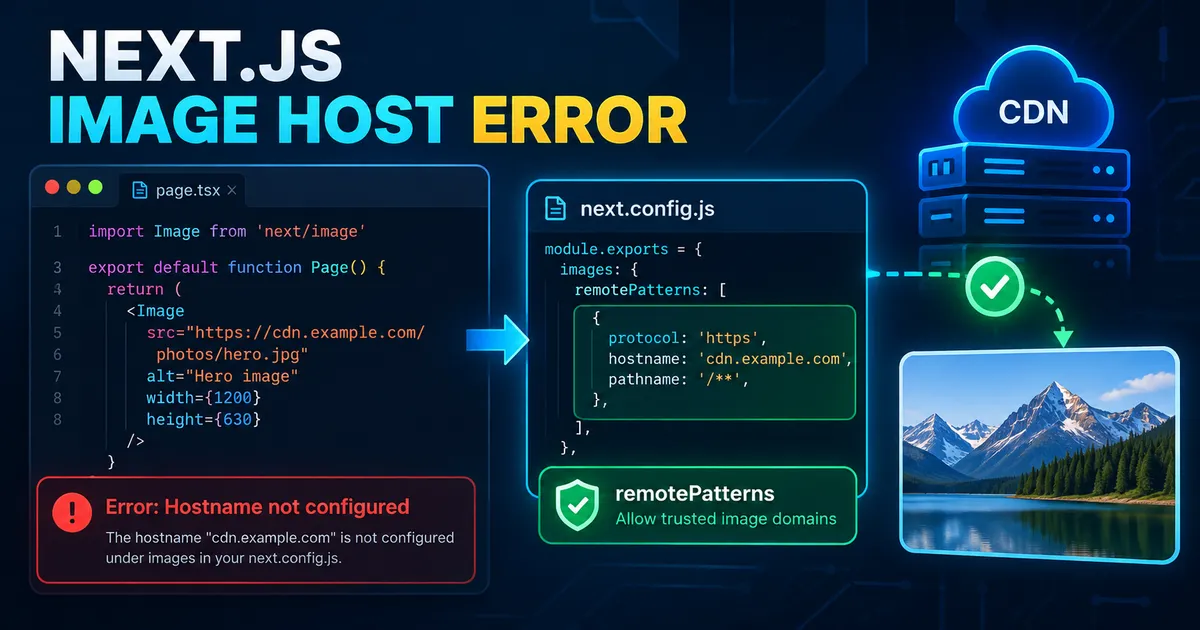
You can open an external image URL in your browser, but this component fails:
import Image from 'next/image';

export default function Page() {
  return (
    <Image
      src="https://cdn.example.com/photos/hero.jpg"
      alt="Landscape"
      width={1200}
      height={800}
    />
  );
}
The application may report:
Invalid src prop ... on next/image, hostname "cdn.example.com"
is not configured under images in your next.config.js
With the default Next.js image optimizer, remote sources must match the configured allowlist. A valid image URL can still be rejected if its host or other URL components do not match images.remotePatterns.
Step 1: Add a narrow remotePatterns rule
In a TypeScript-based Next.js project, edit next.config.ts:
import type { NextConfig } from 'next';

const nextConfig: NextConfig = {
  images: {
    remotePatterns: [
      {
        protocol: 'https',
        hostname: 'cdn.example.com',
        port: '',
        pathname: '/photos/**',
        search: '',
      },
    ],
  },
};

export default nextConfig;
Use your real, trusted image hostname. The example allows HTTPS images at that hostname, with no explicit port, under /photos/, and without query parameters. It does not allow unrelated hosts or arbitrary paths.
Restart the development server after changing the Next.js config:
npm run devNow reload the affected page. A matching image still requires the external resource itself to be accessible.
Step 2: Match the full URL, not just its domain
remotePatterns is strict. Compare:
- Protocol:
https://does not equalhttp://. - Hostname:
cdn.example.comdiffers fromwww.example.com. - Port: an explicit
:4000requires an appropriate port rule. - Path:
/photos/**does not permit/private/hero.jpg. - Search:
search: ''means no query string.
A single-segment path wildcard such as /images/* does not match arbitrarily deep nested folders. Use /images/** only when you intend to allow nested image paths under that prefix.
For a trusted local image server on port 4000, an illustrative development rule is:
remotePatterns: [
  {
    protocol: 'http',
    hostname: 'localhost',
    port: '4000',
    pathname: '/images/**',
    search: '',
  },
]
This is a configuration fragment, not a complete next.config.ts file.
Step 3: Handle URLs with query strings
A CDN might return:
https://cdn.example.com/photos/hero.jpg?v=2That URL will not match a rule with search: ''.
If the exact query string is known and fixed, specify:
search: '?v=2'If your trusted provider requires varying query strings, omit the search property in an object-based remotePatterns rule:
{
  protocol: 'https',
  hostname: 'cdn.example.com',
  port: '',
  pathname: '/photos/**',
  // search omitted intentionally: different query strings are permitted
}
This permits arbitrary query strings within the other restrictions. Do not broaden the rule unless the application requires it.
Be careful with new URL('https://cdn.example.com/photos/**') in supported versions of Next.js: a URL with no query has an empty search string, so it does not act the same as omitting search in an object pattern. URL-object patterns were introduced in Next.js 15.3.0.
Step 4: Configure a public Supabase Storage bucket
A public Supabase Storage image may look like:
https://your-project.supabase.co/storage/v1/object/public/product-images/laptop.jpgFor images from a specific public bucket, use a narrowly scoped rule:
{
  protocol: 'https',
  hostname: 'your-project.supabase.co',
  port: '',
  pathname: '/storage/v1/object/public/product-images/**',
  search: '',
}
Replace the placeholder project and bucket names. Signed URLs may contain query strings and expire; permitting the query string alone does not address expiry, privacy, or image-optimizer fetch behavior. Never make a private bucket public simply to silence a frontend error.
Step 5: Know when you do not need remotePatterns
Files in your project's public directory can use root-relative paths:
public/images/logo.pngimport Image from 'next/image';
export default function Logo() {
return <Image src="/images/logo.png" alt="Logo" width={240} height={80} />;
}Ordinary local public assets do not need a remote hostname allowlist. A separately configured localPatterns restriction can still affect local paths.
Step 6: Avoid outdated or overly broad fixes
The older images.domains option was deprecated starting with Next.js 14 in favor of more precise remotePatterns controls. Prefer exact trusted hostnames and narrow path prefixes. Broad wildcards reduce safeguards and may expose your image optimizer to unexpected external fetches. Also review redirects from a trusted remote host: Next.js documentation notes important behavior for redirect destinations that the allowlist does not automatically re-check.
The unoptimized prop is an intentional alternative when you want to serve a remote image without Next.js image optimization:
<Image
  src="https://cdn.example.com/photos/hero.jpg"
  alt="Landscape"
  width={1200}
  height={800}
  unoptimized
/>
Do not apply it globally just to avoid configuring your source. It changes image delivery and does not fix a broken or inaccessible remote URL.
Step 7: If the hostname error is gone but the image is still broken
Inspect the actual image URL and browser Network panel. A failed /_next/image request can reflect a missing source image, denied access, unavailable CDN, malformed URL, or another optimizer issue. A 400 status alone is not enough to determine the cause. With the default optimizer, authentication headers from the browser are not forwarded when fetching the remote image, so private images may require a different delivery strategy.
Verify the fix in the environment where it originally occurred, including a deployed preview if necessary. Confirm that one allowed URL loads and an unrelated host is not unexpectedly permitted.
FAQ
Why does the URL work directly but fail inside next/image?
Direct browser access does not require the Next.js optimizer to allowlist the remote URL.
Do I configure every filename individually?
No. Use a trusted hostname plus a scoped path pattern covering the images your application needs.
Does a hostname pattern include subdomains automatically?
No. Exact hosts are distinct. Use separately listed trusted hosts or supported, carefully scoped wildcards.
Is this always a configuration problem?
No. Once the hostname rule matches, the image can still fail due to permissions, expired signed URLs, network responses, or source availability.
Conclusion
Fix the hostname error by matching the real URL in images.remotePatterns while keeping the allowed protocol, host and paths as narrow as possible. Restart your application, inspect any remaining network error, and verify both functionality and restrictions.
Official documentation:
Keep the conversation useful
Found a different result?
Include your framework version, the error, and the steps to reproduce it. Specific details help improve the article for the next reader.
Send a correction or question