On this page
Table of Contents
What EADDRINUSE means
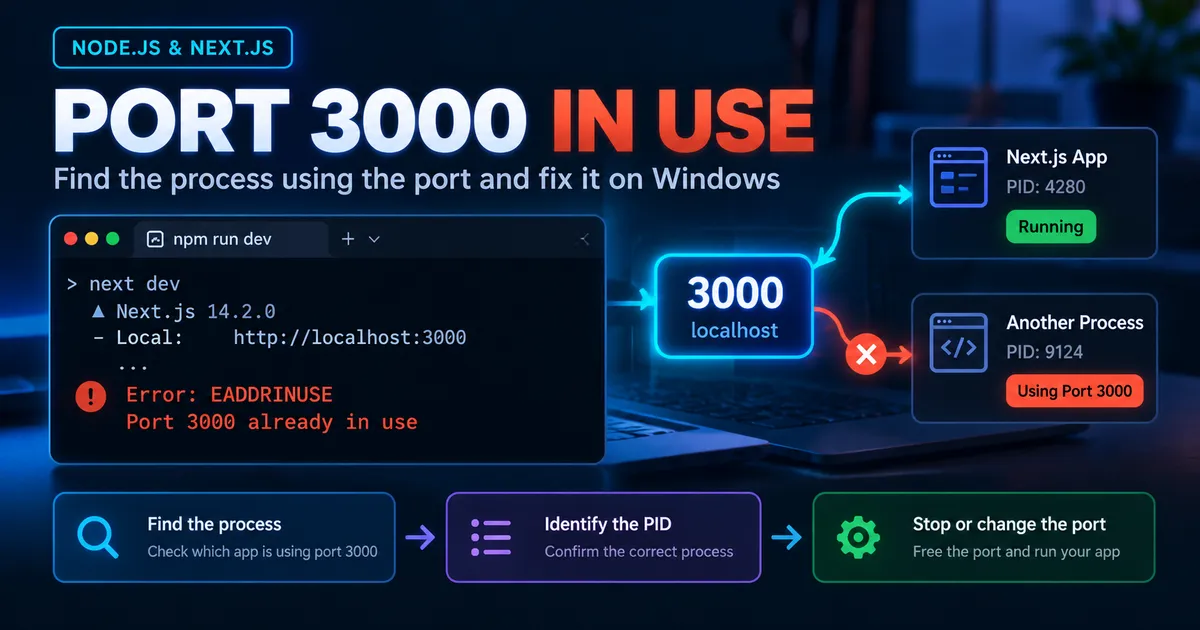
When you start a Node.js server, you may encounter:
Error: listen EADDRINUSE: address already in use :::3000EADDRINUSE indicates the requested listening address and port are already occupied by a conflicting socket. A Next.js development server may instead automatically suggest another available port, depending on version and invocation. The same port number may be used by a Node.js API, an old terminal session, or another local tool.
Do not start by killing every Node.js process. First find which process has the listening socket.
Step 1: Inspect port 3000 in PowerShell
Get-NetTCPConnection -LocalPort 3000 -State Listen |
  Select-Object LocalAddress, LocalPort, State, OwningProcess
An illustrative, untested result could show an owning PID such as 18420. Replace that example number with the PID actually shown on your machine. If there are multiple listening entries, inspect each one.
Step 2: Identify the owner before stopping it
Get-Process -Id 18420 |
  Select-Object Id, ProcessName, Path, StartTime
To inspect a process command line when permitted:
Get-CimInstance Win32_Process -Filter "ProcessId = 18420" |
  Select-Object ProcessId, Name, CommandLine
A process called node is not necessarily the server you want to stop. It might be another application or development service. Command-line output can contain credentials, so inspect privately and avoid posting raw output publicly.
Step 3: Stop only your unused development server
If the original terminal is still open, switch to it and press Ctrl+C. Graceful termination is preferable to forcefully stopping a process.
If that terminal is unavailable, and you have confirmed that the PID belongs to a disposable development process you own:
Stop-Process -Id 18420 -ConfirmThe confirmation prompt reduces accidental termination. Never substitute an unfamiliar PID, and avoid broad Stop-Process -Name node -Force commands.
Verify that port 3000 is now free:
Get-NetTCPConnection -LocalPort 3000 -State ListenNo matching listening connection suggests the port is not currently occupied by a listener visible to this query. Now restart your project:
npm run devStep 4: Run Next.js on another port instead
If both applications need to run, keep the existing process and use port 3001 for Next.js:
npm run dev -- -p 3001This assumes package.json has a script such as "dev": "next dev". The -- forwards following arguments to that npm script. Your new local URL should be http://localhost:3001 if startup succeeds.
You may also configure the project script:
{
  "scripts": {
    "dev": "next dev -p 3001"
  }
}
This JSON is a partial package.json illustration—do not overwrite other scripts or dependency fields. If you change ports, also review callback URLs, reverse proxies, and development-only integrations that refer to port 3000.
Step 5: Make a custom Node.js port configurable
For a native Node HTTP server, use an environment-provided port and an error handler:
import { createServer } from 'node:http';

const port = Number(process.env.PORT ?? 3000);

if (!Number.isInteger(port) || port < 0 || port > 65535) {
  throw new Error('PORT must be an integer from 0 to 65535');
}

const server = createServer((req, res) => {
  res.writeHead(200, { 'Content-Type': 'text/plain' });
  res.end('Development server is running');
});

server.on('error', (error) => {
  if (error.code === 'EADDRINUSE') {
    console.error(`Port ${port} is already in use.`);
  } else {
    console.error(error);
  }
  process.exitCode = 1;
});

server.listen(port, '127.0.0.1', () => {
  console.log(`Listening on http://127.0.0.1:${server.address().port}`);
});
This sample requires an ES-module-compatible Node.js project (for example, "type": "module" in package.json, or an .mjs file). It is not executed in this article.
In PowerShell you can set the port in the current shell:
$env:PORT = '3001'
node server.js
Use this only if your server actually reads process.env.PORT.
Step 6: Troubleshoot recurring conflicts
If the PID disappears and another process immediately starts, a process manager, watcher, or editor task may be restarting the application. Check active VS Code terminals and task runners. Stop or configure the supervising tool rather than repeatedly killing its child process.
If PowerShell finds no listener, check the port number in the full error, the process environment (including WSL or containers), and whether the conflicting process exited between the error and your inspection. From WSL, you can inspect listeners with:
ss -ltnp '( sport = :3000 )'A missing PID in the output may be a permission limitation. Do not assume the Windows host and WSL show identical process lists.
Verification checklist
- Confirm which process owned the old port.
- Stop it gracefully or assign the new app a different port.
- Restart the actual application command.
- Open the URL printed by the development server.
- Recheck the listener using
Get-NetTCPConnectionand confirm the expected application is running.
FAQ
Is reinstalling Node.js necessary?
Usually not. EADDRINUSE is a socket binding conflict, not evidence of a broken Node installation.
Will deleting node_modules help?
Normally no. Dependency files do not control which process already holds a listening socket.
Can multiple Next.js apps run simultaneously?
Yes, when they bind to nonconflicting address/port combinations, such as ports 3000 and 3001.
Is ECONNREFUSED the same error?
No. ECONNREFUSED typically concerns a refused connection attempt; EADDRINUSE concerns binding a listening socket.
Conclusion
Identify the process behind port 3000 before stopping it. For independent development servers, using separate ports is often the easiest long-term arrangement. Verify your change by restarting the application and loading the reported local URL.
Official documentation:
Keep the conversation useful
Found a different result?
Include your framework version, the error, and the steps to reproduce it. Specific details help improve the article for the next reader.
Send a correction or question