On this page
Table of Contents
How to Fix Supabase 403 Forbidden Errors (RLS and Permission Guide)
Your Supabase query works in the SQL Editor, but the same operation fails in your Next.js application.
Instead of receiving the expected data, you see:
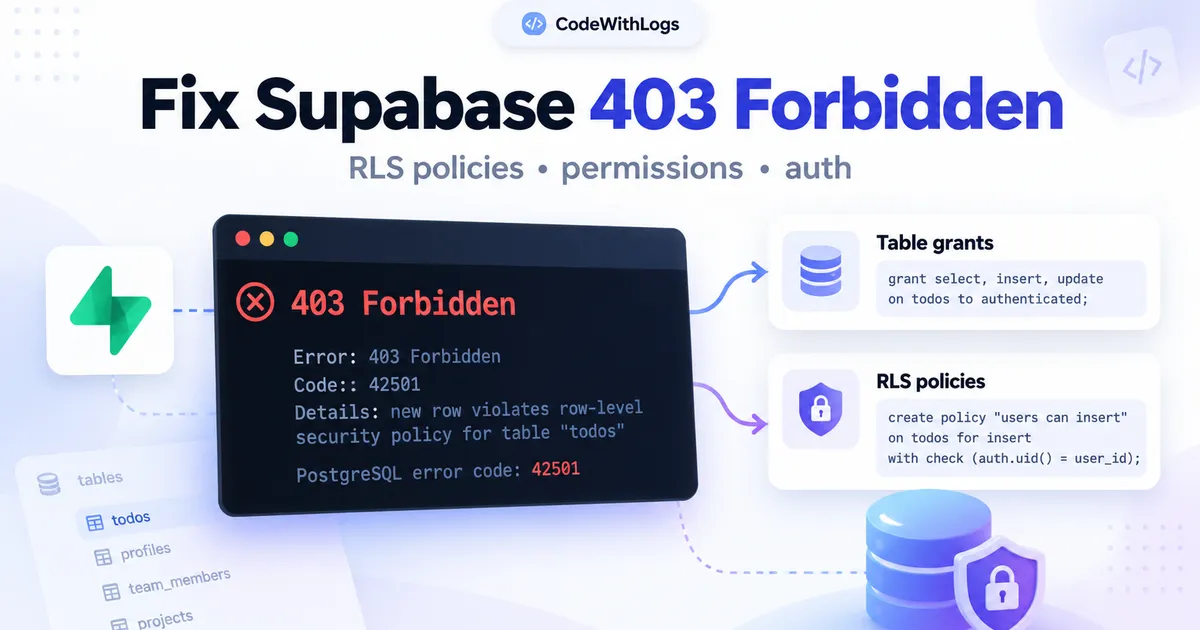
403 ForbiddenOr PostgreSQL returns:
permission denied for table todosSometimes the error is more specific:
new row violates row-level security policy
for table "todos"
These messages can look similar, but they don't always have the same cause.
A Supabase 403 Forbidden error usually means a database request doesn't have sufficient permission to complete. The problem may involve PostgreSQL table grants, Row Level Security (RLS), authentication, or access to a restricted schema.
The correct solution is to identify which permission check failed—not disable security until the request works.
In this guide, you'll learn how to diagnose Supabase permission errors, inspect your database roles, write appropriate RLS policies, and verify that authorized users can access only their own data.
The examples use Supabase JavaScript v2 and PostgreSQL.
Before you begin: The SQL examples below target a disposable development project. Review existing policies and privileges before applying equivalent changes to a production database.
1. What Does Supabase 403 Forbidden Mean?
Supabase exposes PostgreSQL data through its Data API.
When your application makes a query, PostgreSQL evaluates whether the request has permission to perform the operation.
Two different security layers matter:
Database grants: Determine whether a role can perform an operation such as SELECT, INSERT, UPDATE, or DELETE on a table.
Row Level Security: Determines which individual records that role may read or modify.
A request must satisfy both layers.
For example, a user may have permission to read the todos table but only be allowed to see tasks associated with their own account.
Understanding error code 42501
PostgreSQL uses SQLSTATE 42501 for insufficient privileges.
When PostgREST exposes this error through the Supabase Data API, the HTTP status commonly depends on authentication.
- 403 Forbidden: The request is authenticated but lacks required privileges.
- 401 Unauthorized: An unauthenticated request encounters the same permission error.
This mapping is specific to the relevant PostgreSQL error. Not every HTTP 401 or 403 response has the same underlying cause.
Why an RLS denial doesn't always return 403
A missing SELECT grant may produce a permission error.
An RLS SELECT policy that excludes a row often simply hides it.
The query can return an empty array with no error.
For example:
const { data, error } = await supabase
  .from("todos")
  .select("*");
If the user has no visible rows, data may be [].
That doesn't prove the table is empty.
It may mean the applicable RLS policies don't allow that user to read any matching rows.
For INSERT, an RLS WITH CHECK violation can produce error 42501.
Understanding this difference prevents unnecessary policy changes.
2. Inspect the Actual Supabase Error
Before modifying your database, capture the error returned by your application.
Consider a query:
const { data, error, status } = await supabase
  .from("todos")
  .select("id, title, user_id");

if (error) {
  console.error("Supabase request failed", {
    status,
    code: error.code,
    message: error.message,
    hint: error.hint,
  });
}
Inspect four values.
HTTP status: Helps distinguish unauthorized access from other API failures.
PostgreSQL error code: Provides a more precise error category.
Message: Identifies the failed operation or object.
Hint: May provide additional PostgreSQL diagnostic information.
Avoid logging passwords, tokens, private user records, or complete request headers.
Example: A missing table privilege
status: 403
code: 42501
message: permission denied for table todos
This suggests investigating table grants first.
Example: An insert blocked by RLS
status: 403
code: 42501
message: new row violates row-level security policy
This points toward the applicable insert policy and the values being written.
Don't treat both errors as interchangeable.
3. Check Whether the User Is Authenticated
Supabase queries use different database roles depending on the request's authentication state.
Two common roles are:
anon: Requests without an authenticated user session.authenticated: Requests with an authenticated user session.
Using a public Supabase publishable key does not automatically make the caller an authenticated user.
The application still needs a valid user session.
Check the current user
For Supabase JavaScript:
const {
  data: { user },
  error,
} = await supabase.auth.getUser();

if (error || !user) {
  console.error("No valid authenticated user");
} else {
  console.log("Authenticated user confirmed");
}
If no authenticated user exists, policies targeting authenticated won't apply to an ordinary signed-out request.
A common mistake
You create a policy:
create policy "Authenticated users can read"
on public.todos
for select
to authenticated
using (true);
But your JavaScript request is sent without a signed-in session.
The query runs as anon, not authenticated.
The solution isn't to make all records public.
Fix the application's authentication flow and ensure the correct session is attached to the request.
For Next.js Server Components and Server Actions, use a correctly configured cookie-aware Supabase SSR client.
Related guide: Next.js Authentication with Supabase
4. Check PostgreSQL Table Grants
RLS policies don't replace PostgreSQL grants.
A user can satisfy an RLS policy and still receive a permission error because their role lacks access to the table.
Inspect the effective privileges
Using a trusted database session, run:
select
  has_table_privilege(
    'authenticated',
    'public.todos',
    'SELECT'
  ) as can_select,

  has_table_privilege(
    'authenticated',
    'public.todos',
    'INSERT'
  ) as can_insert,

  has_table_privilege(
    'authenticated',
    'public.todos',
    'UPDATE'
  ) as can_update,

  has_table_privilege(
    'authenticated',
    'public.todos',
    'DELETE'
  ) as can_delete;
This query helps identify which operations the authenticated database role can attempt.
It doesn't tell you whether RLS allows access to a particular row.
Grant only the required operations
Suppose a new test table should be readable and writable by signed-in users but completely inaccessible to signed-out visitors.
An example configuration is:
alter table public.todos
enable row level security;

revoke all on table public.todos
from anon, authenticated;

grant select, insert, update, delete
on table public.todos
to authenticated;
These statements don't create the RLS policies. They configure table-level permissions.
The policies still need to restrict which rows each authenticated user can access.
For an existing production table, don't replace grants blindly. Review other application roles, inherited privileges, column-level permissions, and integrations that may depend on them.
Why broad grants are dangerous
This is not a sensible universal fix:
grant all on all tables
in schema public
to anon, authenticated;
It may expose operations that the application never intended to allow.
A better rule is to grant the smallest set of privileges required for each role.
5. Fix an RLS Insert Policy Violation
Consider a todo application where every task belongs to one authenticated user.
The table has:
id
user_id
title
completed
A signed-in user should be allowed to insert only their own tasks.
A suitable insert policy
Assuming RLS and the necessary table grants are already configured:
create policy "Users insert own todos"
on public.todos
for insert
to authenticated
with check (
  (select auth.uid()) = user_id
);
The WITH CHECK condition validates each proposed new row.
If the caller is User A, the database should reject an attempt to insert a row owned by User B.
Include the correct owner ID
The application can obtain the authenticated user's identity:
const {
  data: { user },
  error: authError,
} = await supabase.auth.getUser();

if (authError || !user) {
  throw new Error("Authentication required");
}

const { error } = await supabase
  .from("todos")
  .insert({
    user_id: user.id,
    title: "Review dashboard",
    completed: false,
  });

if (error) {
  console.error(error.message);
}
The client supplies an owner ID here, but the RLS policy is the actual authorization check.
You can also design the table to assign the user ID automatically through a trusted database default or controlled server operation.
What if your insert still fails?
Check whether:
- A matching
INSERTpolicy exists. - The policy applies to
authenticated. - The current request has a valid user session.
- The inserted
user_idequalsauth.uid(). - The role has
INSERTprivilege. - Another applicable restrictive policy blocks the operation.
- A trigger or database constraint changes or rejects the row.
Do not change the policy to WITH CHECK (true) merely to silence the error.
6. Fix SELECT Queries Returning Empty Arrays
An empty query result can be confusing when the table clearly contains data in the Supabase dashboard.
Consider:
const { data, error } = await supabase
  .from("todos")
  .select("*");
The response is:
[]No exception appears.
Why this happens
Your RLS policy may allow the current user to see none of the stored rows.
For example:
create policy "Users read own todos"
on public.todos
for select
to authenticated
using (
  (select auth.uid()) = user_id
);
If the user's UUID doesn't match the user_id of any row, PostgreSQL excludes those records.
This is expected behavior.
How to investigate
Confirm that:
- The user is authenticated.
- The record exists in the expected database.
- The row's owner ID matches the authenticated user.
- The
SELECTpolicy exists and targets the correct role. - The role has the required table grant.
Use a trusted administrative session to inspect fixtures when necessary, but don't use elevated credentials inside browser code.
Remember .single()
If your query uses:
.single()and no rows are visible, it may return a separate result-shape error.
Use .maybeSingle() only when no matching record is an acceptable outcome.
Changing .single() to .maybeSingle() doesn't repair incorrect RLS permissions.
7. Fix UPDATE and DELETE Permission Problems
Reading a row doesn't automatically mean the user may modify it.
PostgreSQL evaluates permissions separately for each operation.
Example: Ownership-based update
create policy "Users update own todos"
on public.todos
for update
to authenticated
using (
  (select auth.uid()) = user_id
)
with check (
  (select auth.uid()) = user_id
);
Here:
USINGchecks the existing row.WITH CHECKvalidates the row after the update.
This prevents an ordinary user from updating someone else's todo or changing its ownership to another user.
Example: Ownership-based delete
create policy "Users delete own todos"
on public.todos
for delete
to authenticated
using (
  (select auth.uid()) = user_id
);
Why UPDATE sometimes affects zero rows
The affected row may be invisible under RLS.
The update may then match nothing rather than raising an explicit permission exception.
Also ensure an appropriate SELECT policy exists, because Supabase updates rely on row visibility.
When debugging, inspect affected-row results rather than treating the absence of an exception as proof that the intended row changed.
8. Inspect Existing RLS Policies
Before creating more policies, review the ones already present.
You can use PostgreSQL's pg_policies view:
select
  schemaname,
  tablename,
  policyname,
  permissive,
  roles,
  cmd,
  qual,
  with_check
from pg_policies
where schemaname = 'public'
  and tablename = 'todos'
order by policyname;
This reveals the policies defined for that table.
Pay attention to the cmd column, which identifies operations such as SELECT, INSERT, UPDATE, or DELETE.
Multiple policies can interact
PostgreSQL policies are permissive by default.
Multiple applicable permissive policies can combine with OR.
That means an additional broad policy may grant access even when another ownership policy looks restrictive.
PostgreSQL also supports restrictive policies, which participate differently.
Review all applicable policies together, not only the one you recently created.
If you're debugging a production permission problem, creating another permissive policy without reviewing existing ones can introduce a security vulnerability.
9. Check Schema and API Permissions
A request may fail because the application is attempting to access a PostgreSQL schema that isn't intended for ordinary API access.
For example, Supabase maintains internal schemas such as auth and vault.
These are not designed for unrestricted browser-side queries.
What if you created a custom schema?
Suppose you created:
reporting.monthly_salesA browser-side query won't necessarily be able to access it through the Data API automatically.
You need to review:
- Whether the schema is exposed through your project's Data API settings.
- Whether the relevant role has schema
USAGEpermission. - Whether that role has the required table privileges.
- Whether appropriate RLS policies protect exposed data.
Do not expose an internal schema solely because a browser query failed.
For sensitive operations, a controlled backend endpoint may be more appropriate.
Avoid bypassing security with service credentials
Secret or service-role credentials are intended for trusted server-side administrative operations.
They must never be embedded in browser JavaScript or exposed through NEXT_PUBLIC_ environment variables.
A permission error is not a reason to replace the application's public key with a privileged secret.
10. A Safe End-to-End Supabase 403 Debugging Workflow
Instead of trying random policies, follow a short diagnostic sequence.
Step 1: Capture the error
Log the HTTP status, PostgreSQL code, message, and safe diagnostic information.
Step 2: Verify the database
Confirm the application uses the intended Supabase project.
A development environment and production environment may contain different tables, grants, or policies.
Step 3: Check authentication
Verify the user is genuinely signed in.
Remember that a publishable key alone doesn't create an authenticated session.
Step 4: Check the role's grants
Inspect whether anon or authenticated has permission for the requested operation.
Step 5: Inspect RLS policies
Check the policies for the specific table and operation.
For example, a SELECT policy alone doesn't authorize an INSERT.
Step 6: Examine the actual row values
For ownership policies, compare the row's user_id with the authenticated user's ID.
Step 7: Test an authorized user and an unauthorized user
Create two independent test accounts.
Confirm that the correct user is allowed and the other user is denied.
Step 8: Recheck the original application request
After fixing the cause, repeat the request through the same environment and authentication flow that originally failed.
A successful privileged SQL Editor query is not enough to prove that an ordinary client request works.
11. How to Test RLS Safely
Use a separate Supabase test project or an isolated local Supabase instance.
Create two authenticated accounts, User A and User B.
Seed records belonging to each account.
Then verify these expected outcomes.
Test 1: User A reads their own data
Expected: The request returns User A's authorized records.
Test 2: User B reads User A's data
Expected: User A's private records are not returned.
Test 3: User A inserts their own record
Expected: The insert succeeds when all grants, policies, and constraints are satisfied.
Test 4: User A inserts a record owned by User B
Expected: The operation is rejected by the ownership policy.
Test 5: Signed-out visitor accesses private records
Expected: The request doesn't expose private data.
Test 6: Unauthorized updates and deletes
Expected: Unauthorized rows remain unchanged.
Depending on the permission layer, denial may appear as an error or a zero-row result.
Automate database tests
Supabase supports database testing with pgTAP through its CLI.
For example:
supabase test dbWrite explicit allow-and-deny assertions for the roles and operations your application uses.
For an authorized write, check that the intended row actually changed. A statement that completes without an error may still have affected zero rows.
Verification note: These examples describe expected behavior, not independently executed results. Test the relevant policies, grants, and application requests in an isolated database before production deployment.
12. Common Mistakes When Fixing Supabase 403 Errors
Disabling RLS to make the error disappear
This can expose private records to roles that already have table privileges.
Keep RLS enabled and correct the underlying policy or grant.
Granting every permission to authenticated users
Not every signed-in user should be allowed to delete, update, or insert into every table.
Use least-privilege grants.
Using WITH CHECK (true) for private data
This can allow operations involving rows that should be restricted.
Use ownership or another appropriate authorization condition.
Trusting frontend filters
A query such as:
.eq("user_id", user.id)is useful for application behavior, but it doesn't replace database authorization.
A different client can construct a different query.
Debugging only in the SQL Editor
SQL Editor queries may run with elevated privileges.
They do not necessarily represent the permissions of an authenticated browser user.
Ignoring silent RLS filtering
An empty result or a zero-row update can indicate that a policy excluded the target row.
Not every authorization problem generates an explicit 403 response.
Adding a SECURITY DEFINER function without reviewing it
A privileged database function can bypass normal access restrictions depending on its owner and configuration.
Only use one when the security design requires it, and review the owner, search path, execution grants, and authorization checks.
13. Supabase 403 Forbidden FAQ
Does Supabase 403 always mean an RLS problem?
No. It can also result from missing grants, restricted schema access, or other permission failures.
Inspect the underlying error code and message.
Why does my query work in Supabase Studio but fail in Next.js?
The SQL Editor may execute under a privileged database identity.
Your Next.js application usually accesses the Data API using a role such as anon or authenticated, which has different privileges and is subject to RLS.
Can I fix 403 by using the service-role key?
Using privileged credentials may bypass some restrictions, but it is not an appropriate fix for ordinary user requests.
Never expose secret or service-role credentials to the browser.
Fix the grants, authentication, and policies instead.
Why does my SELECT return an empty array instead of 403?
RLS may filter out every row without raising an error.
An empty array can be the correct result of the database's access-control rules.
Should I add a policy for every database operation?
Use policies for the operations your application actually permits.
Keep read and write permissions explicit, and deny operations the application does not need.
Is a 401 error the same as 403?
No.
In general, 401 indicates that authentication is required or insufficient, while 403 indicates that an authenticated caller lacks permission.
For PostgreSQL 42501 errors exposed through PostgREST, the authentication state influences which HTTP status is returned.
Final Thoughts
A Supabase 403 Forbidden error is a signal to inspect database permissions carefully.
The solution is rarely to disable RLS or grant unrestricted access.
Start with the actual error code.
Confirm whether the caller is authenticated.
Check table and schema grants.
Inspect the policies that apply to the requested operation.
Then verify the intended behavior with both authorized and unauthorized test users.
The key principle is simple:
A successful database request should prove that the user is allowed to perform the operation—not that security checks have been bypassed.
Related CodeWithLogs Guides
- Supabase Row Level Security Explained with Practical Examples
- 10 Common Supabase Errors and How to Fix Them
- Next.js Authentication with Supabase
- Build an Inventory Management System with Next.js and Supabase
- Error Decoder Tool
Official Documentation
Keep the conversation useful
Found a different result?
Include your framework version, the error, and the steps to reproduce it. Specific details help improve the article for the next reader.
Send a correction or question