
MCP (Model Context Protocol) Explained with a Real Project
MCP finally made sense when I built a real server for it. Here's my Model Context Protocol tutorial — Claude talking to my own database.
Zeeshan Zakir
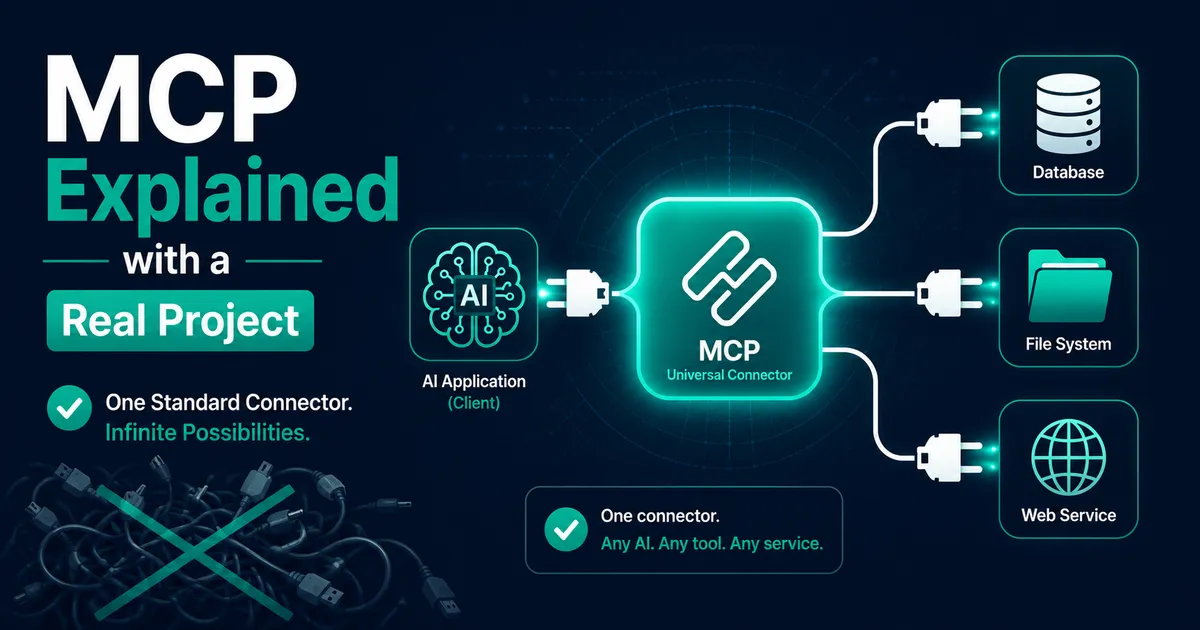
I read three different explanations of the Model Context Protocol and understood none of them. Every article said the same abstract things — "open standard," "connects AI to data sources" — and I kept nodding along without being able to answer the only question that matters: what would I actually build with this?
Then one Sunday I built something with it, and it clicked in about an hour. So this Model Context Protocol tutorial is the explanation I wish I'd found: short on philosophy, long on a real project — an MCP server that lets Claude Desktop query my own Supabase database.
What MCP actually is (one paragraph, no buzzwords)
AI apps like Claude Desktop can use tools, but out of the box they know nothing about your stuff — your database, your files, your APIs. Before MCP, every AI app needed a custom integration for every data source: M apps × N sources = a mess of one-off adapters. MCP standardizes the plug. You write one small server that exposes your data as tools; any MCP-compatible app (Claude Desktop, various IDEs and agents) can connect to it. That's the whole idea. It's not a model, not an agent framework — it's the connector.
The real project
Remember the inventory system I built? The owner's actual workflow for questions like "what's running low?" was: open dashboard, click reports, filter. Meanwhile I was already living in Claude Desktop half the day. So the project became: let Claude answer inventory questions by querying the real database.
One MCP server, two tools: get_low_stock and search_products.
Building the server
The TypeScript SDK does the protocol heavy lifting:
npm install @modelcontextprotocol/sdk zodThe entire server, trimmed only slightly:
import { McpServer } from '@modelcontextprotocol/sdk/server/mcp.js';
import { StdioServerTransport } from '@modelcontextprotocol/sdk/server/stdio.js';
import { z } from 'zod';
import { createClient } from '@supabase/supabase-js';

const supabase = createClient(
  process.env.SUPABASE_URL!,
  process.env.SUPABASE_READONLY_KEY!
);

const server = new McpServer({ name: 'inventory', version: '1.0.0' });

server.tool(
  'get_low_stock',
  'List products whose stock is below a threshold',
  { threshold: z.number().default(10) },
  async ({ threshold }) => {
    const { data, error } = await supabase.rpc('low_stock_report', {
      p_threshold: threshold,
    });
    if (error) throw new Error(error.message);
    return { content: [{ type: 'text', text: JSON.stringify(data) }] };
  }
);

server.tool(
  'search_products',
  'Search products by name, returns name, SKU and current stock',
  { query: z.string() },
  async ({ query }) => {
    const { data } = await supabase
      .from('product_stock_view')
      .select('*')
      .ilike('name', `%${query}%`)
      .limit(10);
    return { content: [{ type: 'text', text: JSON.stringify(data) }] };
  }
);

const transport = new StdioServerTransport();
await server.connect(transport);
Two things to notice. The zod schemas aren't just validation — they're how the model learns each tool's parameters. And the transport is stdio: Claude Desktop launches your server as a child process and talks to it over stdin/stdout. No ports, no hosting, it runs on your machine.
Plugging it into Claude Desktop
Claude Desktop reads a config file (claude_desktop_config.json) listing your servers:
{
  "mcpServers": {
    "inventory": {
      "command": "node",
      "args": ["/absolute/path/to/inventory-mcp/dist/index.js"],
      "env": { "SUPABASE_URL": "...", "SUPABASE_READONLY_KEY": "..." }
    }
  }
}
Restart Claude Desktop (fully — quit, not close), and a small tools indicator appears. Then the moment that sold me: I typed "which products are running low?", Claude asked permission to use get_low_stock, ran it, and answered with actual rows from my actual Postgres — including a product I genuinely didn't know was down to four units.
The security decision I'm glad I made early
My first draft included an update_stock tool. Then I sat with the thought: an AI, with write access to production, triggered by natural language, on my machine. I deleted it. The server now uses a dedicated read-only path — a database role and views that expose exactly the columns needed, nothing more. My rule since: MCP servers start read-only, and every write tool has to argue its way in individually. The protocol will happily let you hand over your whole database; the restraint is on you.
The bugs that will get you (they got me)
console.log breaks everything. The stdio transport means stdout is the protocol channel. My innocent debug logging corrupted the message stream, and Claude just showed the server as failed with no useful error. Log to stderr instead — console.error — which is exactly the kind of thing you learn at 11pm.
Relative paths in the config. The args path must be absolute. Claude Desktop's working directory is not your project folder.
Forgetting the rebuild. It's a compiled file being launched — edit TypeScript, forget npm run build, wonder for ten minutes why nothing changed. I added a watch script eventually.
Config changes need a full restart. Closing the window isn't quitting the app.
Where I've landed on MCP
The honest assessment: for a public-facing product feature, I'd still build tool calling directly into my app (that's what the agent in my Responses API project does). MCP shines for the personal and internal layer — giving your everyday AI apps standardized access to your systems, once, instead of rebuilding the same bridge inside every tool. Since the inventory server, I've added one for my analytics and one that reads my project's docs folder. Each took under an hour, because the shape never changes.
That's the tutorial I wanted: MCP is a plug standard. Build one small server for something you actually own, and the abstract diagrams will suddenly seem obvious.
Need help building this?
I offer full-stack development services for startups and product teams.
If you want a faster path from idea to shipped product, I can help with architecture, frontend systems, backend APIs, and launch-ready builds.
View ServicesShare this post
Related posts
More practical reading from the blog to keep your momentum going.
AI Memory Systems: Short-Term vs Long-Term Memory
Every API call meets a total stranger — LLMs remember nothing. How AI memory systems actually work: short-term, long-term, and forgetting.
Vector Databases Explained with Supabase pgvector
I almost paid for a dedicated vector database. Turns out Postgres does it. A practical pgvector tutorial with Supabase — setup to indexes.
How I Added AI Search to My Next.js Website
Users searched "remove account," my docs said "delete account," search returned nothing. So I added AI semantic search to my Next.js site.